Stumble, then keep going
Fix Mistakes Without Starting Over: Retakes and Long Pauses in FoxTake
If you stumble, lose your place or flub a line, you do not have to stop and start the whole video again. Pause, say the complete sentence again and keep going. When you make the video, FoxTake's one-tap video workflow detects the repeated attempt and proposes cutting the earlier one; it can also trim silence at the start and end and shorten long pauses. Every cut is a suggestion: review it, restore words or choose an earlier attempt before you share.
Messed up a line? Say it again and keep going
Starting over after every mistake is what makes recording take so long. When you misspeak, trip over a word or lose your place in the script, pause briefly and repeat the complete thought in the same recording. A complete replacement sentence is easier to evaluate than an isolated replacement word. FoxTake calls these repeated attempts retakes.
For example: The session is on Friday. The session is on Saturday at three.
A human can check which statement was intended, but the automatic cut still needs review. This is an illustrative example, not a benchmark proving detection accuracy.
Not every repeated phrase is a mistake. It may be emphasis, comparison or a necessary explanation. A corrected number or a negation can also change the meaning of a professional statement.
Trim silent ends and shorten long pauses
In the one-tap video options, Cut Retakes removes the earlier attempt, Trim Start and End removes the silence before you start and after you finish, and Shorten Long Pauses tightens long gaps between sentences. Shorten Long Pauses is off by default; the in-app note in this build says shortened pauses become 0.4 seconds.
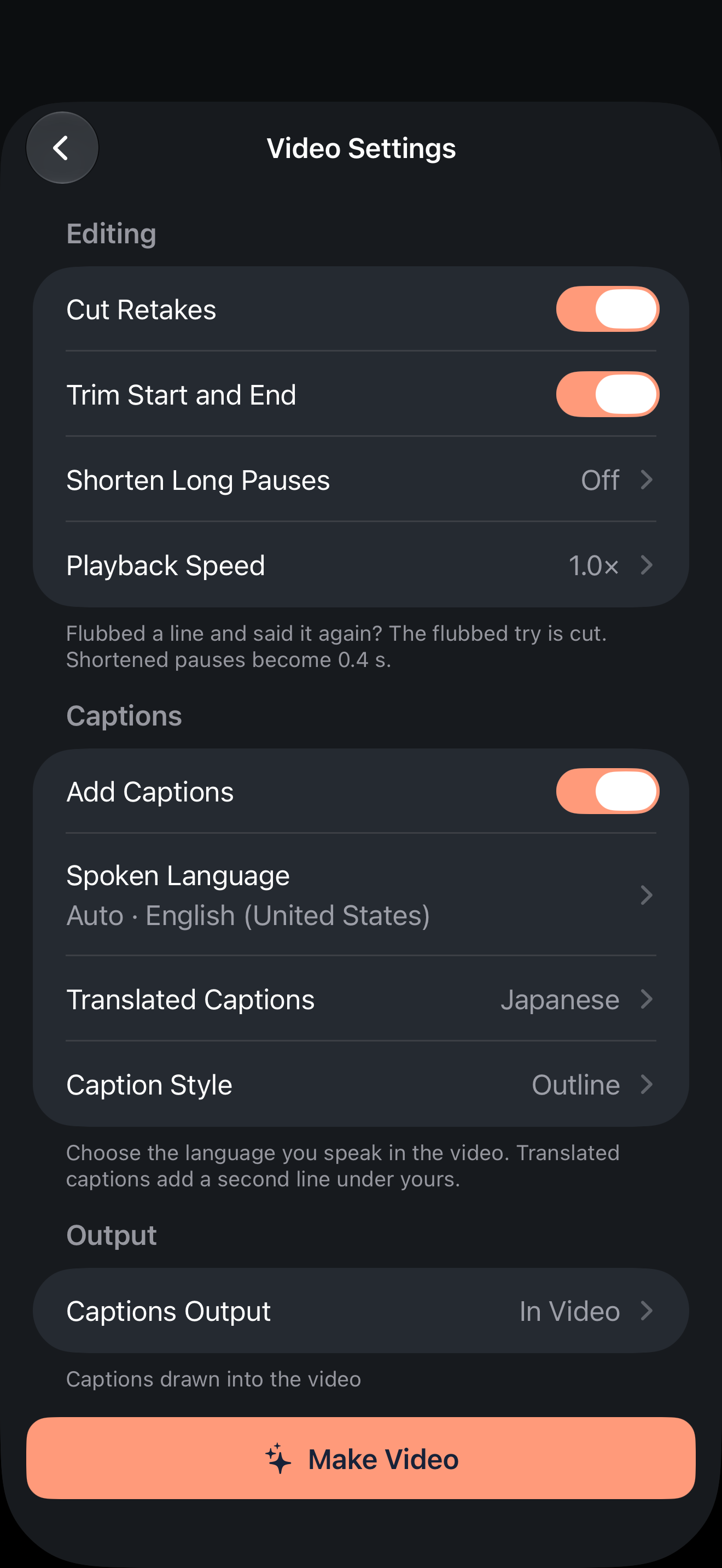
These options work on repeated attempts and silence. Listen for filler words such as um
yourself during review, and keep a pause where it helps the listener follow a point.
Open review before or after making
- Select the recording and enter the one-tap video workflow.
- To review before the first render, enable Review Before Making (also labeled Check Before Making in some builds) in the options. It is off by default.
- Inspect the timeline and proposed changes. You can also review and remake after the initial result.
- Play the surrounding audio before accepting a deletion.
Restore or choose an alternative
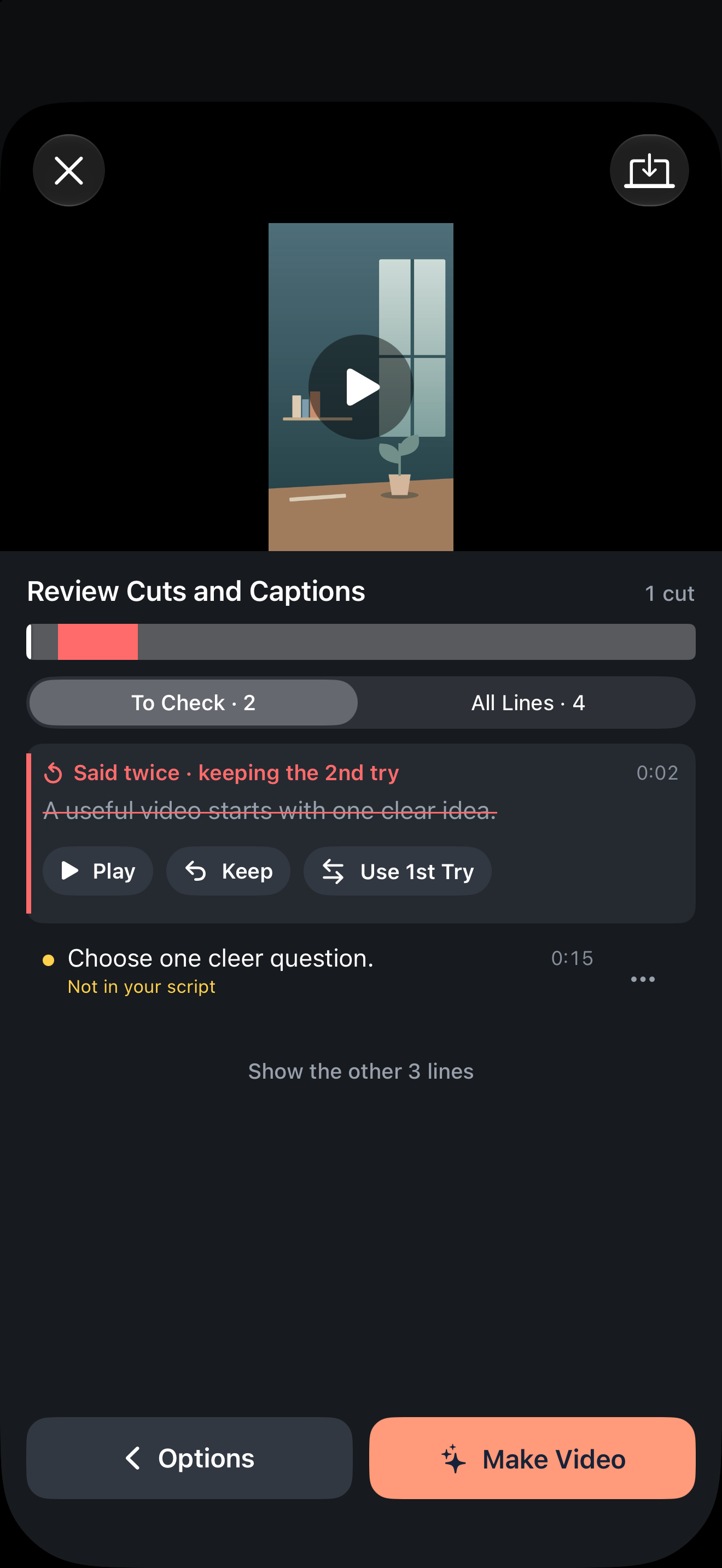
The timeline marks portions proposed for removal. Restore a cut if those words should remain; retain the deletion if it removes the unwanted attempt. Where the retake offers an alternative, choose the previous attempt if it communicates better.
The review list can focus on items to check or show all caption lines. Important context can sit outside a flagged item, so use the broader view when uncertain.
- Was the correction retained instead of the original mistake?
- Did intentional repetition survive?
- Was a necessary condition or qualification removed?
- Do joined passages sound coherent when played together?
Optional AI Check
Online AI Check helps inspect cuts and caption words. After agreement, it sends recognized text with timings and the script through the online service, not the video picture. It does not replace your own review. Supported on-device processing remains available with online AI off. One-tap video still uses credits.
Retakes are different from later pickups
Choosing between attempts already in a recording is different from recording a new replacement sentence afterwards. Do not assume a dedicated sentence-level pickup feature or automatic matching of voice, lighting and posture across sessions.
After your choices, render or remake and play across the cut points in the exported result. Keep the original source so you can change an edit if the retained passage is wrong.
Version and sources
Written for international FoxTake 2.0, based on the published App Store description and release implementation. Other interface languages use localized control labels.